
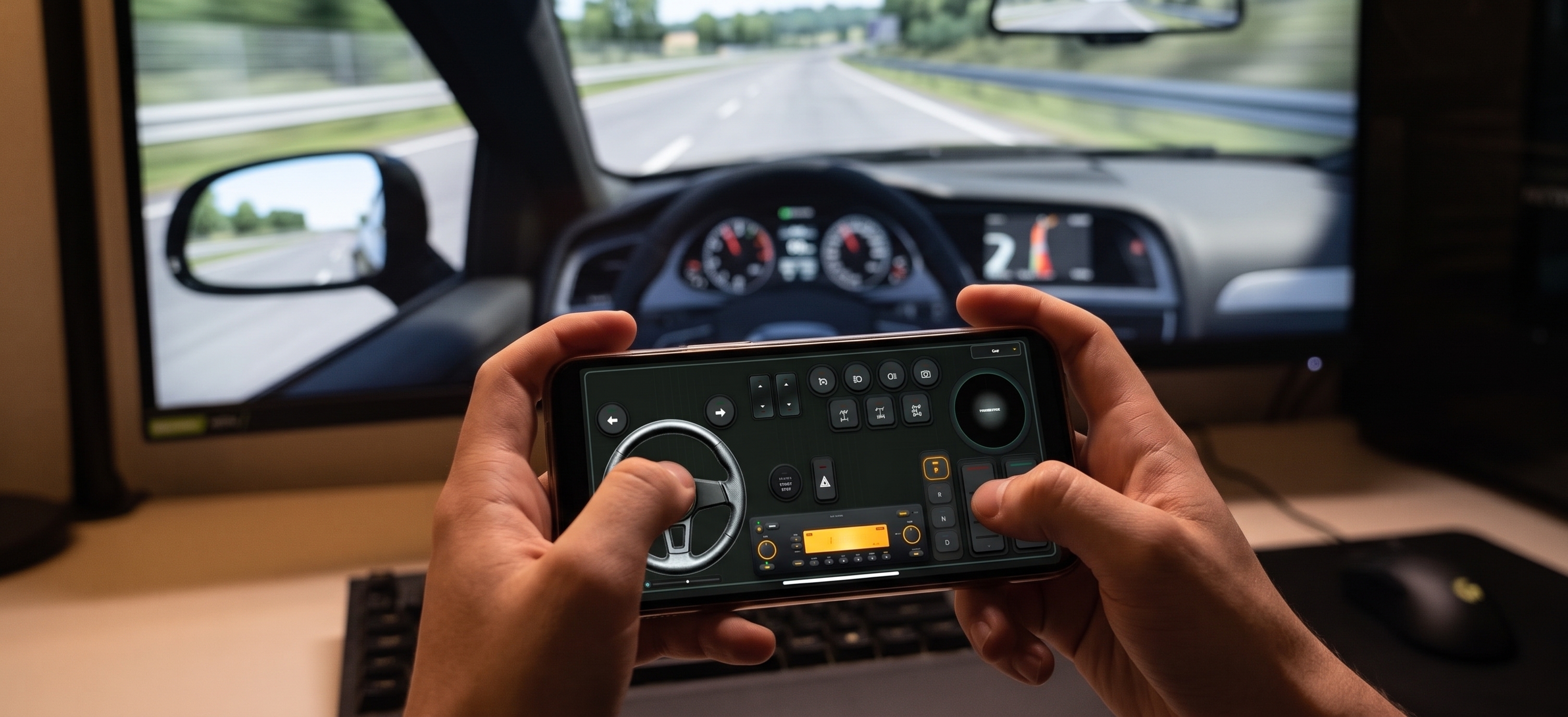



A high-end direct drive sim racing setup with load-cell pedals and a 900-degree wheel will easily set you back $800 to $1,500. For casual sim racers, truck simulation enthusiasts, and rally cross fans who only play a few hours a week, that financial barrier keeps them locked out of immersive driving physics. However, your pocket already contains a high-precision 6-axis inertial measurement unit (IMU), an OLED display, and a high-speed Wi-Fi transceiver. By leveraging RojX to bridge your mobile device directly to Windows, you can deploy a fully functional virtual steering wheel for the cost of zero dollars.
Harnessing the 6-Axis IMU for 900-Degree Steering
Traditional gamepads treat joysticks as binary switches or restricted analog inputs, making smooth counter-steering in titles like Assetto Corsa or BeamNG.drive nearly impossible. A true virtual steering wheel requires proportional tracking across a wide rotational sweep. RojX solves this by pulling raw telemetry directly from your smartphone's internal gyroscope and accelerometer at 100Hz polling rates.
When you tilt your phone left or right, the software samples angular velocity and gravitational vectors to calculate precise steering angles. Because the app scales this movement, a comfortable 90-degree physical tilt of your hands translates cleanly into a full 900-degree lock-to-lock rotation in your game. To dial in the steering feel:
- Set your in-game steering saturation to match the 900-degree profile in the RojX host application.
- Apply a slight steering non-linearity value of 1.25 to soften center-position twitchiness while retaining aggressive steering lock at maximum tilt.
- Enable the auto-centering spring physics within the RojX Windows companion app to give your hands physical feedback resistance as the virtual wheels attempt to straighten out.
USB Tethering vs. 5GHz Wi-Fi: Eliminating Input Lag
In competitive sim racing, latency is the ultimate enemy. A delay of even 50 milliseconds between turning your hands and seeing the front tires bite into the asphalt will ruin your braking zones. RojX operates over local Wi-Fi via high-speed UDP protocol, achieving an elite latency window of just 3ms to 8ms on uncongested local networks.
⚠️ IMPORTANT: Ensure your Windows Firewall is not blocking inbound UDP traffic on port 27015. If your router experiences heavy wireless interference from smart home devices, switch your phone and PC to an isolated 5GHz Wi-Fi channel width of 80MHz.
For hard-core racers demanding absolute zero packet loss, plug your smartphone directly into your PC via a USB cable and enable USB tethering. This completely bypasses the wireless spectrum, delivering wired-grade polling stability that rivals dedicated hardware.
Ergonomic Mounting: Building a DIY Phone Rig
Holding a smartphone in your bare hands while trying to modulate virtual pedals and shift gears leads to rapid wrist fatigue and erratic steering lines. To build a proper immersion setup, you need a rigid mounting interface.
- The Desk Clamp Approach: Use an adjustable gooseneck tablet or phone mount clamped firmly to your desk edge at a 45-degree angle. This mimics the exact steering column height and rake of a real sedan or GT car.
- The 3D-Printed Wheel Shell: If you have access to a 3D printer, download an open-source wheel frame shell that snaps around your phone, featuring hand grips on either side.
- Cardboard Prototype Rig: For a quick weekend project, mount your phone securely inside a sturdy cardboard steering yoke coupled to a makeshift PVC pipe pivot shaft.
Once mounted, configure your touch button layouts. You can map custom interface buttons for headlights, ignition, traction control levels, and camera views right on the lower half of your screen while using the top half for HUD telemetry. If you want to expand your simulation horizons, check out our comprehensive BeamNG.drive Physics & Steering Guide for advanced vehicle setup parameters.
Sim Racing Rig Build Breakdown: Budget vs. Performance
| Component | DIY Phone Wheel Approach | Traditional Hardware Alternative | Cost Difference | Feel & Immersion |
|---|---|---|---|---|
| Steering Input | Smartphone IMU + RojX Virtual Wheel | Entry-level 900° Force Feedback Wheel | Save $250 - $400 | Excellent gyro tracking; replaces expensive motorized force feedback with software auto-centering. |
| Pedals | Touchscreen virtual pedals / Keyboard triggers | 3-Pedal Hydraulic / Potentiometer Pedal Set | Save $150 - $300 | Functional digital response; can be paired with cheap USB macro pads for progressive analog braking. |
| Shifter | Customizable touch button paddle shifters | H-Pattern or Sequential USB Shifter | Save $80 - $200 | Instantaneous paddle response mapped directly to screen taps or device volume buttons. |
| Chassis Mount | Desk clamp / 3D printed phone wheel bracket | Dedicated Aluminium Extrusion Cockpit | Save $400 - $1,000 | Rigid enough for casual to intermediate racing without taking up permanent room space. |
Configuring Digital Pedals and Progressive Braking
Sim racing without proper pedal feedback requires creative configuration. Because touchscreens register binary touch inputs, slamming on the brakes can lock your tires instantly, sending you sliding into the wall at the first turn.
To combat this inside games like Euro Truck Simulator 2 or arcade racers, configure your virtual brake pedal with an increased brake sensitivity curve and enable anti-lock braking systems (ABS) in your game settings. For optimal comfort during long hauls, read our detailed Euro Truck Simulator 2 Setup Guide to map your touch controls for maximum ergonomic efficiency.
💡 PRO TIP: Map your clutch or handbrake to a secondary, older Android or iOS device running RojX alongside your main steering phone. This gives you a dedicated button deck and multi-template switching without cluttering your primary driving display.
Integrating AI Webcam Head Tracking for Ultimate Immersion
Steering is only half the battle when trying to hit apexes on blind mountain passes. To truly elevate your budget rig, pair your virtual steering wheel setup with RojX's AI webcam head tracking integration. By mapping your natural head movements to in-game camera look angles, your view dynamically shifts toward the apex as you enter a corner, providing spatial awareness that single-monitor setups normally lack.
Getting started takes less than three minutes: download the free Windows host receiver, install the mobile app from the iOS App Store or Google Play, connect over your local network, and map your inputs to the emulated Xbox 360 controller driver. You will instantly unlock professional-grade sim racing control mechanics without breaking the bank.
Turn your smartphone into a virtual 900° steering wheel right now
No expensive $300 wheel hardware required. Play Forza, Euro Truck Simulator 2, BeamNG, and Assetto Corsa with butter-smooth gyro steering and zero lag over Wi-Fi.
Point your iPhone or Android camera to install.